
The till that keeps selling even when the internet doesn't
SmarterPOS is a point-of-sale system built for Ugandan shops, pharmacies and hardware stores: offline-first checkout, MTN MoMo & Airtel Money built in, and every branch synced to one dashboard.
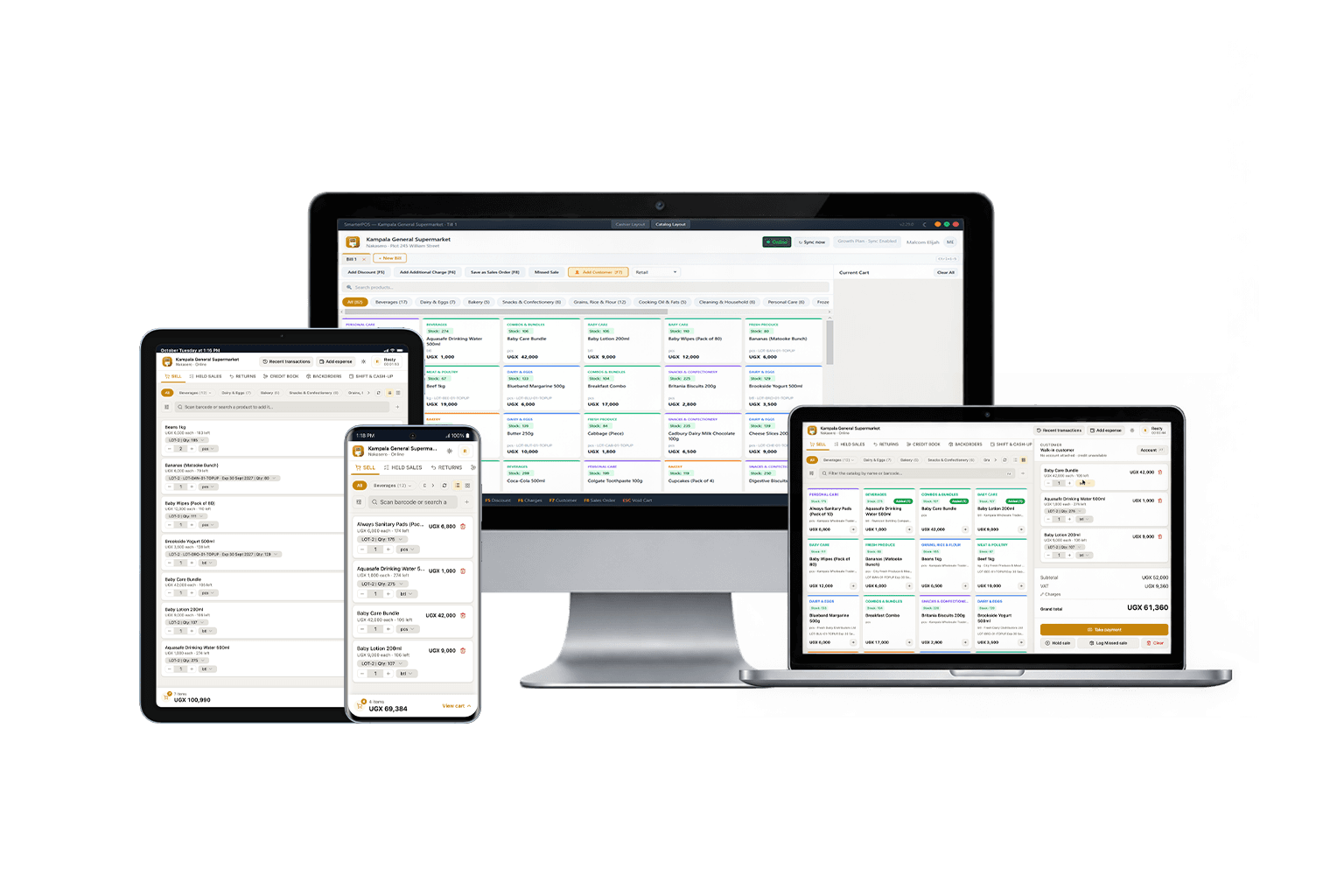
Built for how business actually happens in Uganda
Not a generic POS with translations bolted on. Every core decision starts from unreliable connectivity, mobile money, and businesses that wear more than one hat.
Works with no internet at all
Every terminal runs on a local database, so scanning, checkout, and stock intake never wait on a connection. Sales queue up and push to the cloud automatically the moment you're back online. Nothing is ever lost.
Built around mobile money
MTN MoMo and Airtel Money sit right next to Cash as full-width checkout buttons, not buried in a menu, because in Uganda mobile money isn't an edge case: it's how most people pay.
One owner, every branch, every business
Run a grocery and a pharmacy under the same account, each with its own catalog. Every branch, terminal, and cashier rolls up into one dashboard, with stock transfers kept honest between branches.
Uganda's numbers, out of the box
UGX formatting, 18% VAT, and receipts are the defaults, not an add-on configuration. Expiry tracking and prescription flags come standard for pharmacies; reorder levels and low-stock alerts for everyone else.
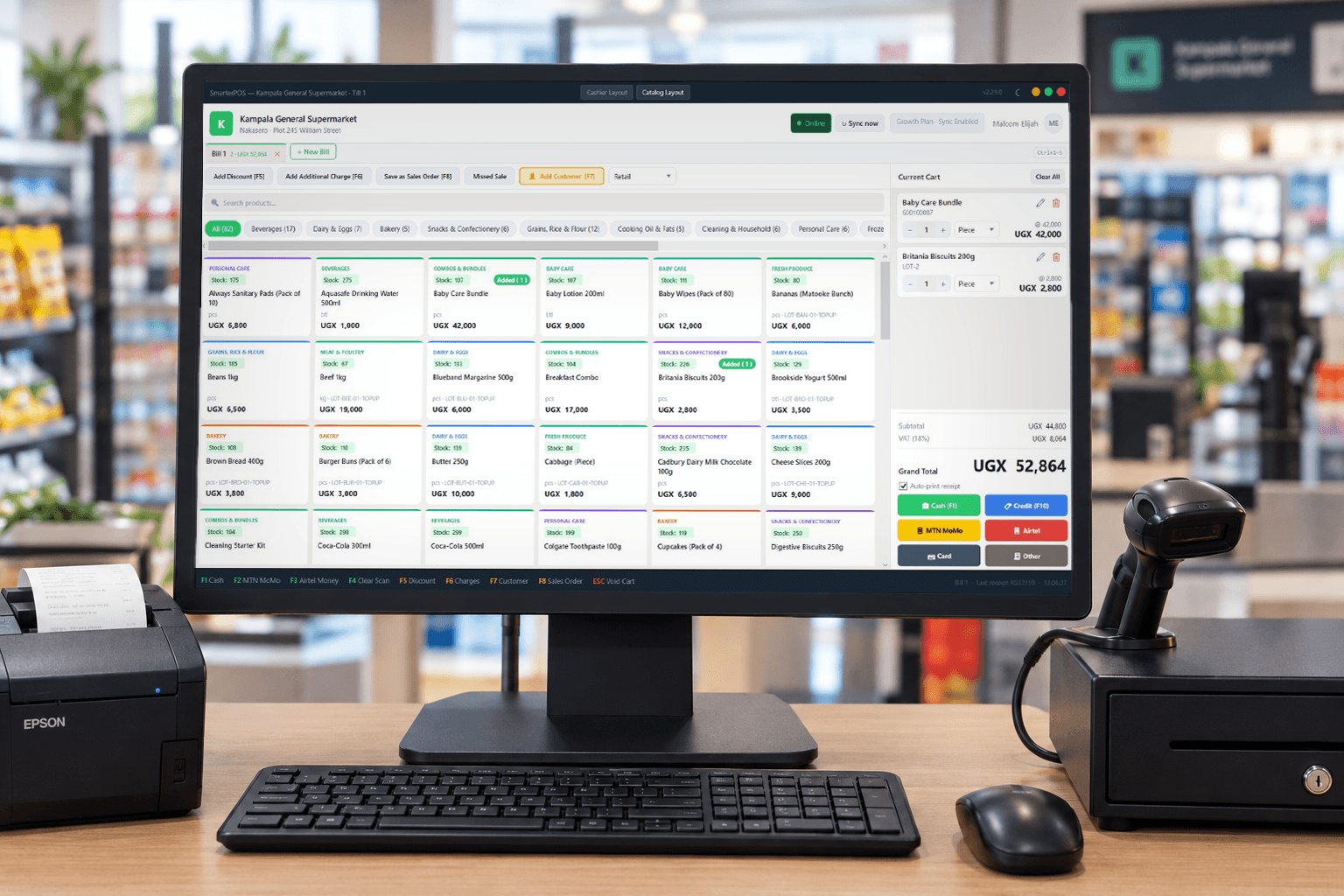
Scan, tap, done, even on a bad network day
Cashiers scan barcodes or search by name, and every payment method a Ugandan customer actually uses is one tap away: Cash, MTN MoMo, Airtel Money, or Credit. A live online/offline badge and sync status are always visible in the header.
- Barcode scanning with instant cart updates
- Cash, MTN MoMo, Airtel Money and Credit built in
- Category pills and low-stock badges right on the till
- Thermal or A4 receipts and invoices, reprintable from the portal
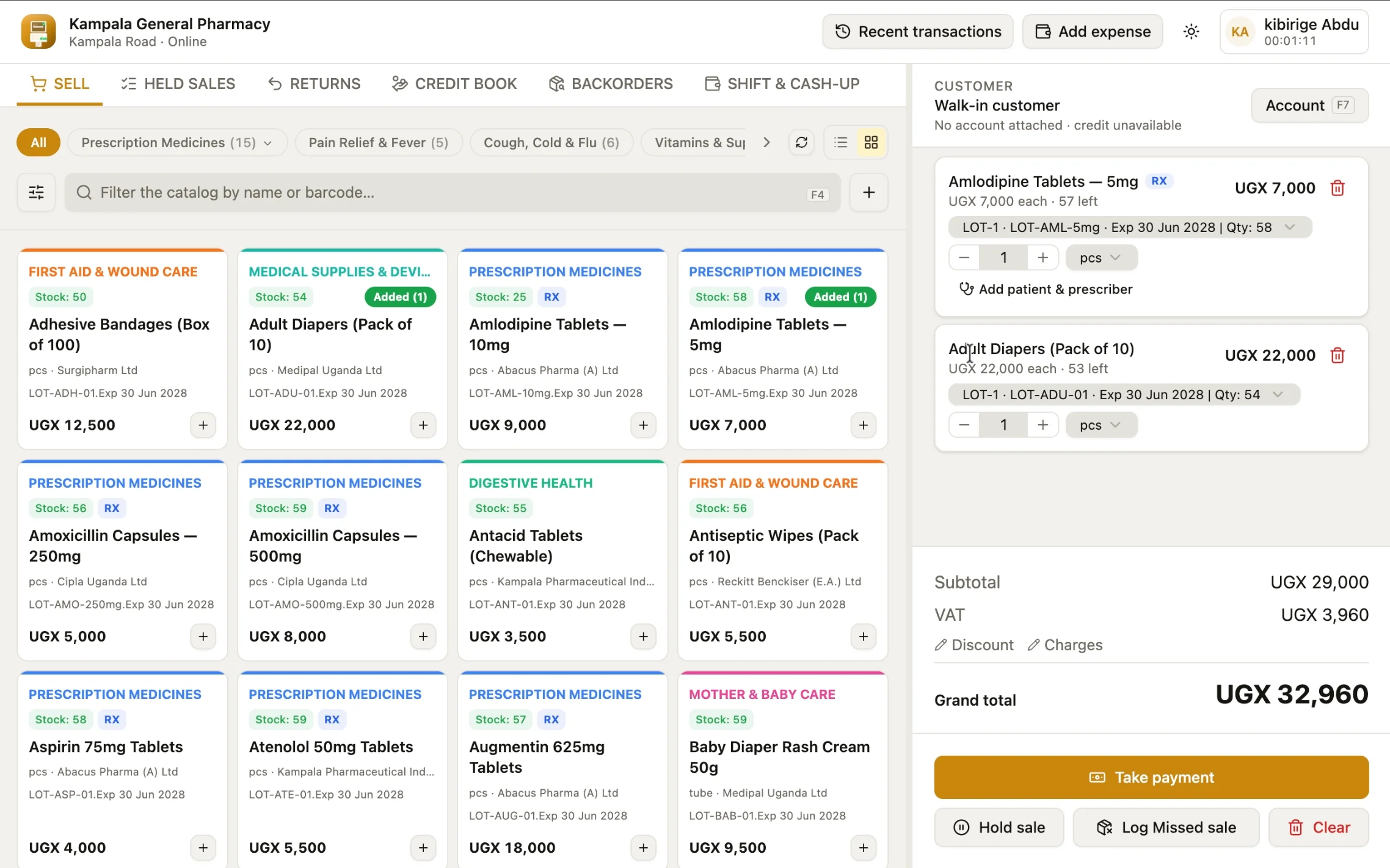
A pharmacy till knows it's a pharmacy
Switch business type and the catalog adapts: prescription flags, expiry dates, and near-expiry warnings appear automatically on pharmacy products, alongside the same fast checkout every other business gets.
- Rx and expiry badges shown directly on product rows
- Controlled drugs register, updated automatically as regulated sales happen
- Low-stock and expiring-soon alerts surfaced up front
- Batch-level expiry reporting, with write-off for stock that's gone past date
- Products classified by brand and generic name, not just category
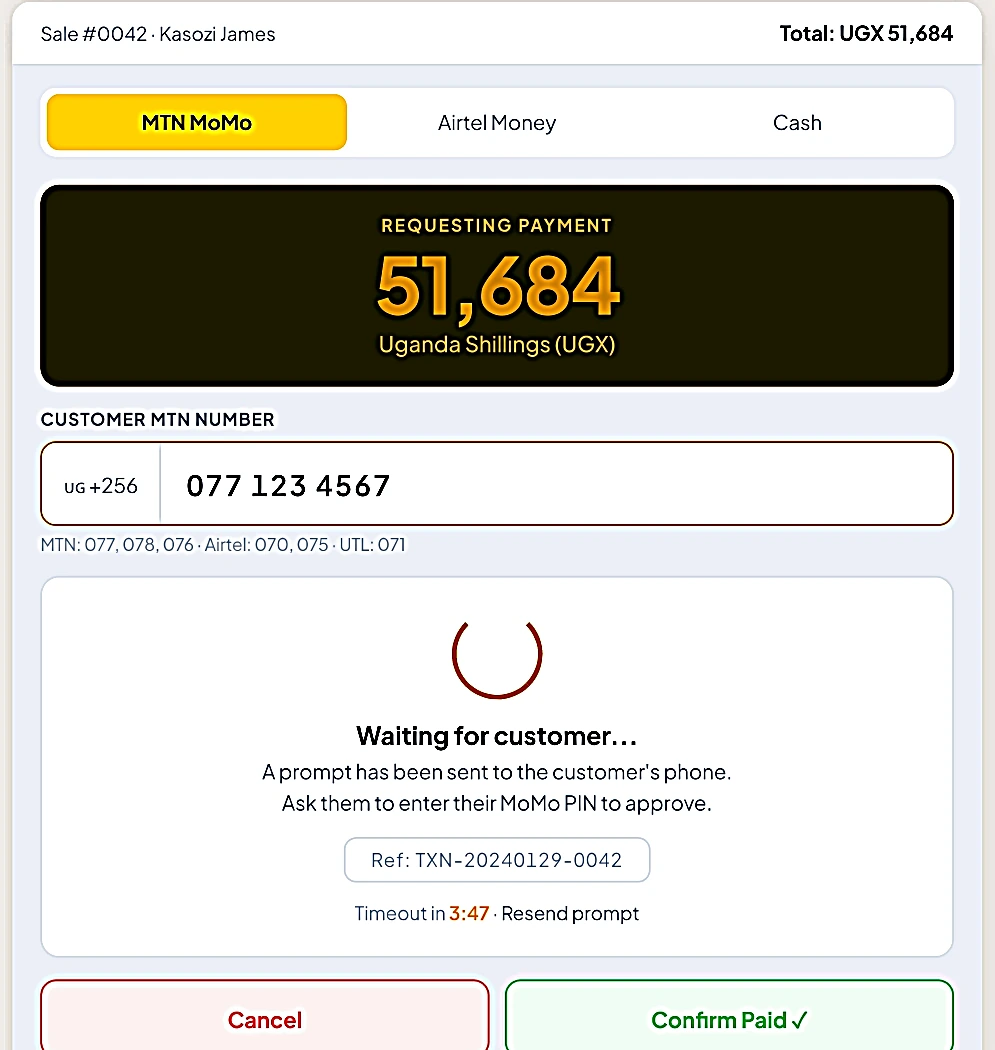
MoMo payments customers already understand
Tap MTN MoMo or Airtel Money, confirm the customer's number, and SmarterPOS shows a live "waiting for customer" state with the transaction reference, the same flow cashiers already use every day, just faster.
- One tap to request payment on the customer's phone
- Live status while the customer approves on their end
- Reference numbers captured automatically for reconciliation
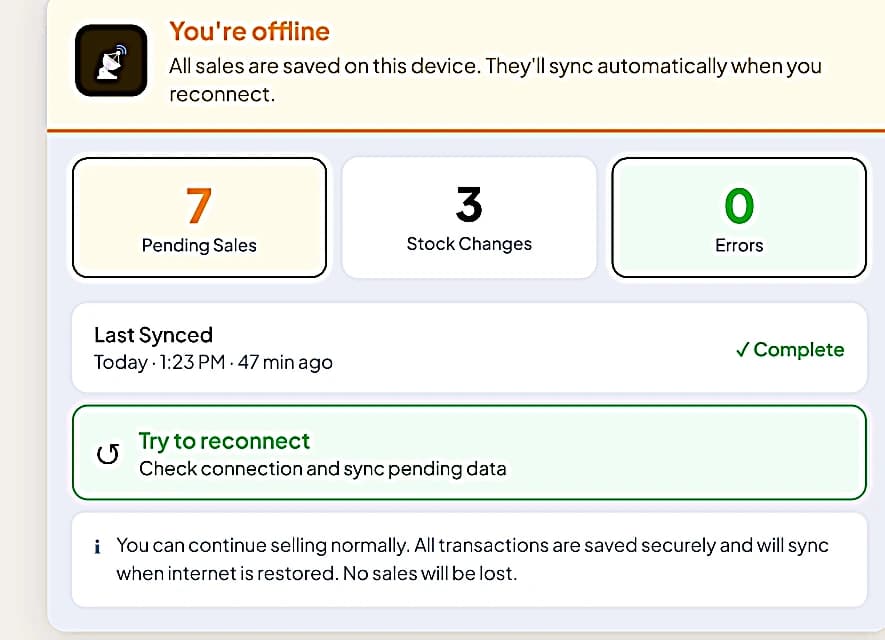
"You're offline" is a status, not a stop sign
When the connection drops, a clear banner says so, and selling continues exactly as before. Pending sales and stock changes are counted on screen, and a single tap retries the sync the moment signal returns.
- Sales and stock changes save locally, first
- Pending counts and last-synced time always visible
- Automatic background sync roughly every minute once online
Every shift closes with a number that matches
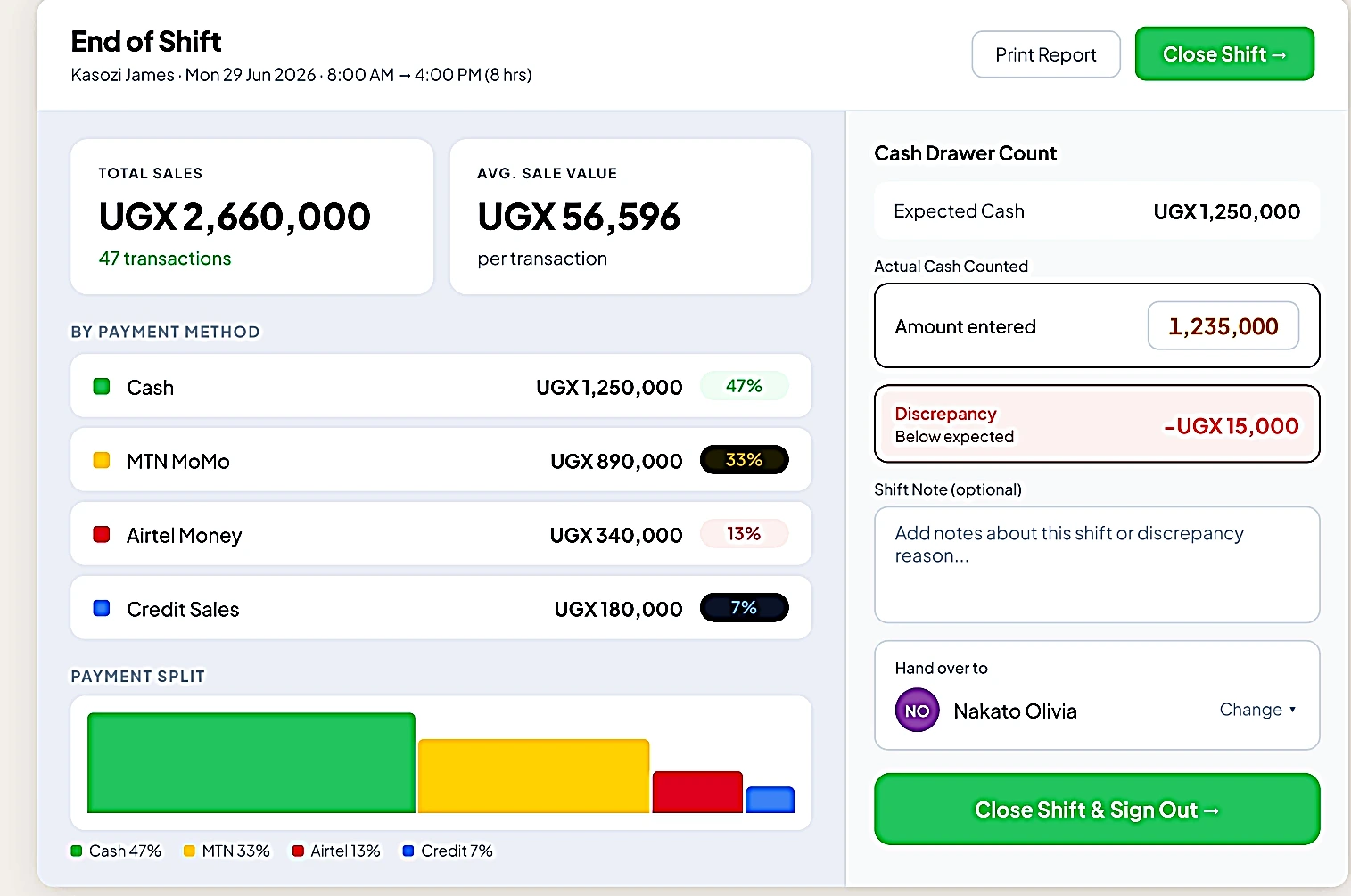
End-of-shift walks cashiers through counting the drawer, breaks down sales by payment method, and flags discrepancies immediately, so cash handling issues surface the same day, not at month end.
- Automatic payment-method breakdown per shift
- Expected vs. actual cash counted, with discrepancy flagged
- Direct hand-over to the next cashier coming on shift
Local-first at the till, connected everywhere else
One architecture, three moving parts: a terminal that never stops, a sync engine that catches up quietly, and a portal that shows the whole business.
Sell from any terminal, online or not
Each till runs its own local database. Cashiers sign in with a 4-digit PIN, scan products, and take payment at full speed, whether or not the shop's internet is working that day.
Everything syncs the moment you're connected
In the background, a sync engine quietly pushes completed sales and stock movements to the cloud and pulls down the latest catalog, prices, and staff list. It all happens automatically, roughly every minute.
See your whole business from one dashboard
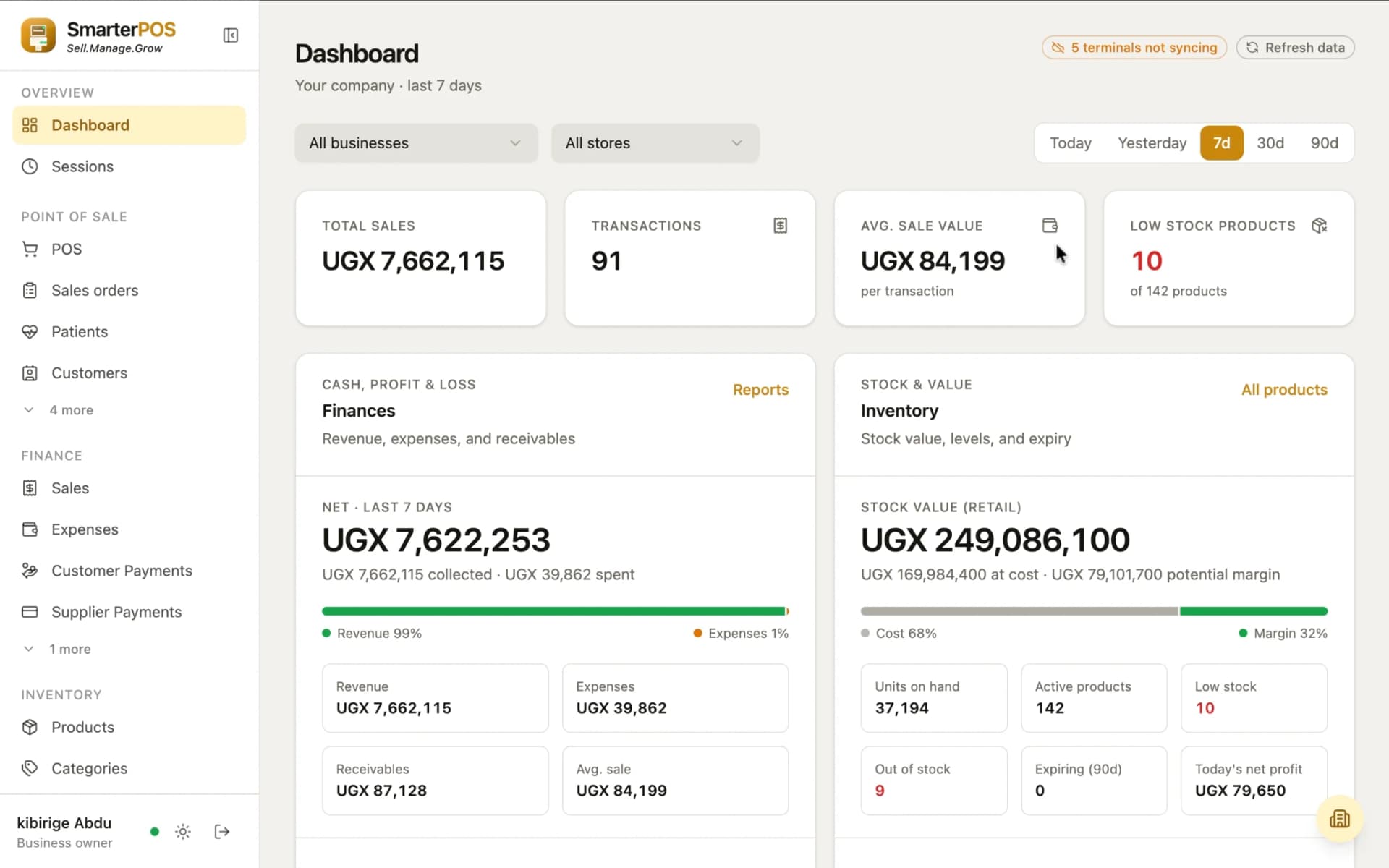
Owners and managers open the web portal from anywhere to see live sales trends, payment-method splits, low-stock alerts, and per-cashier performance across every branch and business, with exportable reports whenever they need the numbers offline.
One dashboard for every branch, business, and till
The SmarterPOS web portal is where owners and managers run the business from the outside in: live sales, reports, stock, and a full browser checkout, across every branch and every business type, without a single store visit.
- Live sales, revenue, and payment-method breakdowns, filterable by branch
- Low-stock alerts across every branch, in one place
- Exportable sales and stock reports, PDF or Excel, any date range
- A full checkout you can run right in the browser, not just the till
- Fully responsive: sell from a phone or tablet, not just a desktop
Runs the back office, not just checkout
Sales orders, expenses, suppliers, stock transfers, and staff: the parts of running a shop that happen away from the counter, all in one account.
Sales orders
A clerk can park a customer's basket and print a slip. Any till in the business can look it up and take payment the moment the customer reaches the counter.
Expense tracking
Log cash payouts (rent, transport, supplies) straight from the till with a manager PIN and an optional receipt photo, feeding directly into end-of-shift cash reconciliation.
Purchasing
Branch staff raise a requisition for what's needed, a manager approves it, and outstanding lines flow straight into a purchase order with quantities and supplier prefilled, printable or savable as a PDF and ready to send to your supplier.
Stock transfers
Move stock between branches with a proper dispatch-and-receive workflow, so nothing goes unaccounted for between two locations on the same account.
Stock counts
Run a proper stock take with a blind-count option that hides the system's expected quantities from whoever's counting, so figures only reveal once the count is done. No copying the "right" answer.
Credit book
See every customer with an outstanding balance in one place (who owes what, who's over their limit) so chasing credit sales doesn't rely on memory.
Reports & analytics
Sales trends, payment splits, per-cashier commission, and profit broken down by product, category, supplier, or branch, plus an expiry report for stock that needs to move, all exportable to PDF or Excel.
Flexible catalog
Single, Variable, or Combo products: set a variable product's shared details once instead of re-entering them per size or colour. Plus tags, custom units of measurement, selling price groups, and your own custom fields.
Terminals & staff
Pair a new till with a one-time code, manage owner, manager, and cashier roles from the portal, reset a forgotten PIN without a store visit, and review an audit log of who did what.
Every feature, across the till and the portal
Nothing here is a future roadmap item. This is what's shipped today in the desktop app and the web portal, grouped by what it's for.
Checkout & payments
- Barcode scanning with instant cart updates
- Cashier list or visual Catalog tile layouts
- Cash, MTN MoMo, Airtel Money, Credit & Split payments
- Selling price groups: different prices for different customers
- Parked bills: hold up to 5 sales at once
- Sales orders: hold a sale, pay at any till later
- Backorders: sell stock you don't have yet, fulfil it when it arrives
- Missed-sale logging for lost demand
- Thermal & A4 receipts and invoices, reprintable anywhere
- Browser-based checkout that works on a phone or tablet too, not just as a backup till
Inventory & stock
- Full product catalog: barcode, price, cost, margin
- Single, Variable, or Combo products: set a variable product's shared details once, not per size or colour
- Categories, brands, generics & free-form tags
- Custom units of measurement with conversion ratios (e.g. 1 carton = 12 pieces)
- Custom fields for anything built-in ones don't cover
- Stock intake for incoming deliveries
- Branch-to-branch stock transfers
- Stock counts, with a blind-count option
- Low-stock & out-of-stock alerts on reorder levels
- Low-stock email digest to admins, morning and evening
- Batch & expiry tracking
- Expiry report with one-step write-off
Purchasing & suppliers
- Supplier directory
- Purchase requisitions raised by branch staff
- Purchase orders built from approved requisitions
- Purchase orders you can print or save as a PDF for a supplier
- PO fulfilment tracking
Reports & analytics
- Live dashboard: sales trend, payment split, top products
- Per-cashier performance & commission report
- Profit & loss by product, category, brand, supplier, or branch
- Stock movement reports
- Exportable PDF & Excel reports
- Shift & cash-variance history
- Full activity/audit log
Multi-branch & staff
- Multiple business types on one account
- Branches & terminals, paired with a one-time code
- Role-based accounts: owner, manager, cashier
- Self-service PIN reset
- Shop branding on receipts and the till
Pharmacy-ready
- Prescription (Rx) flags at checkout
- Controlled drugs register, updated automatically on every regulated sale and ready to print for inspection
- Batch & expiry tracking with write-off
- Patient records tied to a sale
- Brand & generic (INN) product classification
Reliability
- Offline-first: a local database on every terminal
- Automatic background sync once reconnected
- PIN sign-in with idle auto-lock
- Fingerprint sign-in on supported devices
- Automatic software updates
Money & accountability
- Expense tracking / cash payouts
- Credit book for customer balances
- End-of-shift cash reconciliation
One account, every business type you run
Own a grocery and a pharmacy? Run both under one SmarterPOS account, each with its own catalog and settings, and roll everything up into a single view.
General Retail
Fast barcode checkout for shops selling a broad, everyday mix of goods.
Grocery
High-volume scanning with category browsing for supermarkets and general stores.
Pharmacy
Prescription flags, expiry tracking, and near-expiry alerts on every product.
Hardware
Unit-of-measure aware pricing for goods sold by piece, length, or bulk.
Boutique
Clean catalog browsing for fashion and lifestyle retail.
Restaurant
Fast order entry built for food and beverage service.
A plan for every stage of growth
Straightforward monthly plans with generous limits. Add a branch, till, or user any time you outgrow them. Every plan includes offline-first checkout and mobile money out of the box.
Starter
One shop, finding its feet
- 1 business, 1 branch, 2 tills, 5 users
- Offline-first checkout, syncs the moment you're back online
- Stock intake, transfers, and stock taking
- MTN Mobile Money & Airtel Money at the till
- Core sales & inventory reports
- Email support
Growth
More than one till to look after
- Everything in Starter
- Up to 3 businesses, 3 branches, 10 tills, 20 users
- Purchase orders & purchase requisitions
- Multi-branch reporting & comparison
- Staff commissions & fine-grained permissions
- Priority support
- Need more room? Add branches, tills, or users any time
Enterprise
Multiple businesses, run your way
- Everything in Growth
- Unlimited businesses, branches, tills & users
- Remove "Powered by SmarterPOS" branding from receipts
- Custom onboarding & data migration
- Dedicated account manager
Need more room?
Go over a plan's limit without jumping to a whole new plan. Add exactly what you need.
Questions you might have
Still running your shop on cracked software?
A lot of shops run their till on a cracked copy of QuickBooks Point of Sale or something similar, because it was free to download. It isn't actually free. Here's what that choice is quietly costing.
No real backups
Cracked software usually can't reach the vendor's servers, so there's no cloud copy of your sales. If the one PC it runs on dies, is stolen, or its drive fails, months of sales, stock, and customer records can disappear with it.
Hidden malware risk
Cracked installers are one of the most common ways malware ends up on a business PC. Keyloggers and ransomware bundled into "cracked" business software are well documented, and this is a machine that already handles your sales and customer data.
No support when it breaks
Cracked software fights its own license checks and tends to break more, not less. When it does, on a busy Saturday afternoon, there's no one to call. You're on your own.
Frozen in time
No updates means no bug fixes, no new features, and no adapting as tax rules or payment methods change. The software you're on today is the software you're stuck with.
Costs more than it saves
Skipping a subscription fee feels like a saving, until a hard drive fails, a scam catches a customer's card details, or stock data quietly corrupts for weeks before anyone notices.
It isn't legal to use
Running unlicensed commercial software carries real legal and reputational risk for a registered business, separate from, and in addition to, every practical risk above.
Switching is easier than it looks
If this sounds familiar, you're not alone, and there's no judgment here. We'll help you migrate your existing product catalog and customer records, train your staff, and get your first branch running on software you can actually trust, with real backups, real support, and nothing to hide from an audit.
Book a free migration consultationSee SmarterPOS running in your business
Book a demo and our team will walk you through exactly how SmarterPOS would run in your business, then help you get set up, from installing the till to onboarding your first branch. No commitment required.